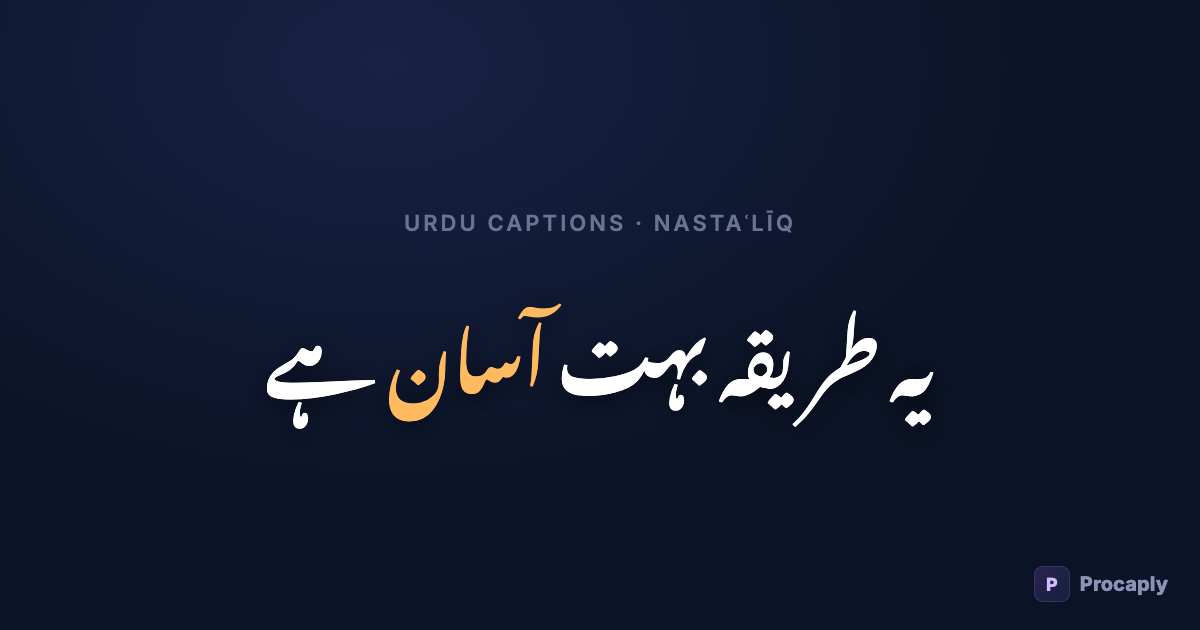
Urdu is one of the hardest languages to caption well. The script flows right-to-left, letters change shape depending on their neighbours, and the Nastaʿlīq style that Urdu readers expect hangs diagonally across the line — something most video editors were never built to draw. That's why so many Urdu Reels ship with broken captions, English-only captions, or none at all.
- Manual captioning fails on timing; mainstream auto-captions fail on the language itself.
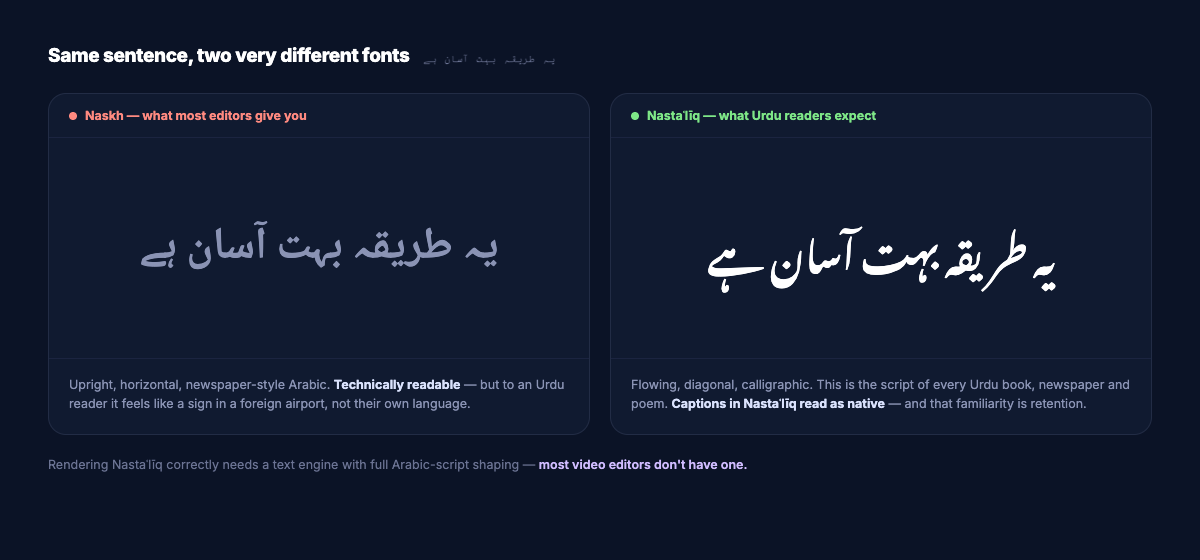
- The font matters as much as the words — Urdu needs true Nastaʿlīq, not generic Arabic Naskh.
- Word-level timestamps are what unlock the karaoke-style reveals big creators use.
- Always burn captions in — platform SRT renderers throw your font work away.
This guide covers the three ways to get Urdu captions on a video, the step-by-step for the automated route, and the mistakes that make Urdu captions look wrong.
Option 1: Type them manually in your editor
CapCut, Premiere and VN all let you add text layers, and this works — until it doesn't:
- Timing by hand is brutal. A 60-second Reel has 120–180 spoken words. Syncing each caption chunk to speech takes far longer than shooting the video.
- Font trouble. Many editors render Urdu in a generic Arabic font (Naskh), which reads like a newspaper headline, not natural Urdu. Some break the letter joining entirely — here's why that happens.
- No word-level effects. Manual text layers can't do the word-by-word reveal that keeps viewers reading.
Option 2: Auto-captions in mainstream apps
Auto-caption features in mainstream editors are trained mostly on English and a handful of European languages. Point them at Urdu speech and you typically get one of: a refusal ("language not supported"), a Hindi transcription in Devanagari script, or English words that only rhyme with what was said.
Even when recognition partly works, none of them will write proper Urdu orthography — the ہ/ھ distinction, ں for nūn-ghunna, correct ذ/ز/ض/ظ by etymology. To an Urdu-literate viewer, captions with the wrong ہ read the way "definately" reads to an English editor: instantly amateur.
Option 3: A captioning tool built for Urdu
This is the category Procaply is in. The pipeline looks like this:
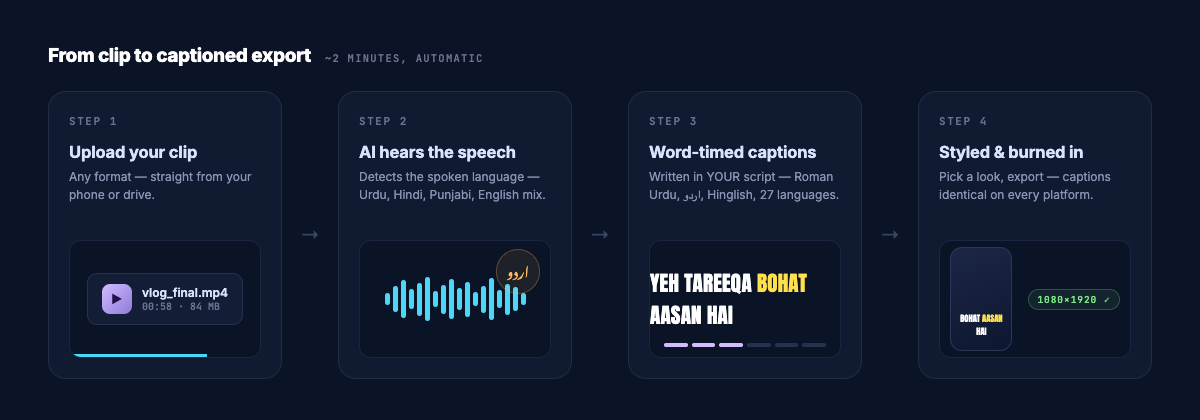
- Speech recognition tuned for South-Asian speech — it hears Urdu (and the English words mixed in, because every real Urdu speaker code-switches).
- AI writes the captions in your chosen script — proper Urdu script, Roman Urdu, or 25 other languages, with English brand names kept in English.
- Word-level timestamps — every word knows when it was spoken, which unlocks karaoke-style reveals.
- Correct Nastaʿlīq rendering — captions are drawn with a real Urdu font and burned into the video, so they look identical on every phone.
Step by step: an Urdu Reel, captioned in ~2 minutes
- Upload the clip and pick your caption language — Urdu script, Roman Urdu, or any of 27. The spoken language is detected automatically, so a clip that drifts between Urdu, Punjabi and English needs no settings.
- Watch it transcribe. You'll see the words appear as the AI hears them, then convert into your chosen script.
- Fix anything. Click any word to edit it — names and brand words are the usual suspects. Edits keep their timing.
- Pick a look. Templates set font, colours, highlight style and reveal in one tap; the preview is exactly what will burn.
- Export. The captions are burned into the pixels — what you previewed is what every viewer sees, on every device.
Urdu script or Roman Urdu?
It depends on your audience, and the honest answer for most creators is both matter:
| Urdu script (اردو) | Roman Urdu | |
|---|---|---|
| Best for | Older audiences, literary/religious content, Pakistan TV-style content | Gen-Z audiences, diaspora, mixed Urdu-English content |
| Readability at speed | Needs a proper Nastaʿlīq font | Reads fast on any phone |
| Reach | Urdu-literate viewers | Anyone who speaks Urdu/Hindi, including those who can't read the script |
We wrote a full breakdown in Roman Urdu captions: why they get more views — including the bilingual two-line layout that captures both audiences at once.
Five rules for Urdu captions that look professional
- Use a true Nastaʿlīq font (Noto Nastaliq Urdu is the safe choice) — never a generic Arabic font.
- Keep lines short. Nastaʿlīq needs vertical room; 4–6 words per line prevents overlap.
- Leave English words in English. "AI", "business", "subscribe" should stay Latin — that's how people actually talk, and transliterating them reads as a mistake.
- Burn the captions in. Platform-side captions (uploaded SRT) render in whatever font the platform picks — you lose the script quality you worked for.
- Highlight the key word in each line with a colour — retention studies on short-form video consistently favour captions viewers can follow word by word.
Frequently asked questions
Can CapCut or Premiere auto-caption Urdu speech?
Not reliably. Their speech models are built around English and major European languages; Urdu speech typically comes back as a "not supported" error, a Devanagari Hindi guess, or English soundalikes. Even where recognition partly works, the caption renderer usually lacks Nastaʿlīq — so both the words and the look need fixing.
Can I caption Urdu speech into other languages?
Yes — the same audio can become captions in Hindi, English, Arabic, Bengali or any of 27 supported languages; translation happens in the same pass as transcription.
What about Punjabi or Pashto speech?
Speech detection is automatic, so Punjabi, Pashto and mixed-language clips work the same way — pick the output language you want.
Do burned-in captions hurt reach?
No — burned captions are just pixels. What platforms reward is watch time, and captions demonstrably increase it for sound-off viewers, which is the majority of feed traffic.